Quick answer
Best help desk ticketing systems in 2026: for B2B, account-based support, Supportbench — account context, dynamic SLAs and AI included from $32 per agent per month (annual), with no per-resolution AI fees. Zendesk fits large, high-volume omnichannel teams; Freshdesk and Zoho Desk are the low-cost all-rounders; Help Scout fits simple shared-inbox support; Jira Service Management fits IT/ITSM; Pylon fits Slack/Teams-native SaaS; Intercom fits AI-first chat deflection.
Picking from the best help desk ticketing systems in 2026 isn’t about finding the tool with the longest feature list. The best help desk ticketing systems win by matching a platform to how your team actually works — your channels, your customers, your budget, and how much IT muscle you have to keep it running. The wrong fit shows up later as add-on invoices, stalled implementations, and agents living in five browser tabs.
Coming off Freshdesk specifically? Start with our Freshdesk alternatives comparison.
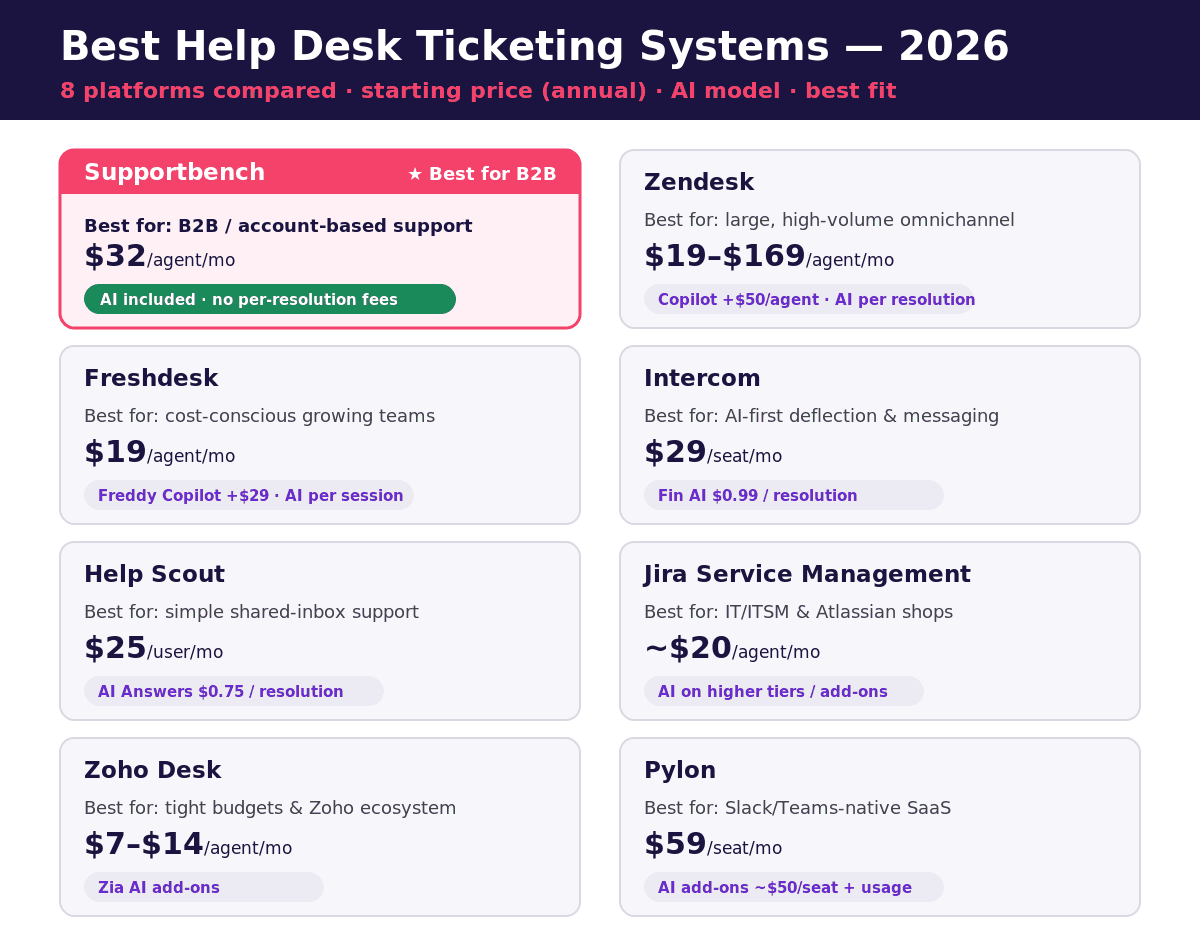
This guide ranks the best help desk ticketing systems — eight of the most widely used help desk and ticketing platforms — Supportbench, Zendesk, Freshdesk, Intercom, Help Scout, Jira Service Management, Zoho Desk, and Pylon — with current 2026 pricing, how each handles AI, and the support model each one is genuinely built for. We pay special attention to B2B and account-based support, where most “best help desk” lists fall short. Further down you’ll find picks by team type (startups, non-technical teams, SMBs, enterprise, IT/MSP), a feature checklist to use in demos, a capability matrix, and what goes wrong when teams switch. (New to the discipline? Start with our complete guide to B2B customer service.)
TL;DR: the quick picks for 2026
- Best for B2B, account-based support: Supportbench — account-level context, dynamic SLAs, and AI included from $32/agent/month, with no per-resolution AI fees.
- Best for large, high-volume omnichannel teams: Zendesk — deep customization and 1,000+ integrations, at a premium price.
- Best low-cost all-rounder: Freshdesk or Zoho Desk — affordable entry points for smaller teams.
- Best for simple, human shared-inbox support: Help Scout — clean, email-first, easy to adopt.
- Best for IT/ITSM and dev-heavy teams: Jira Service Management — strong if you already live in Atlassian.
- Best for Slack/Teams-native SaaS support: Pylon — ticketing built around real-time messaging.
- Best for AI-first, conversation deflection: Intercom — strong Fin AI agent, priced per resolution.
The best help desk ticketing systems compared at a glance (2026)
List prices below are published per-agent/month rates on annual billing as of 2026. AI capabilities, premium support, and implementation are frequently billed separately — always confirm what’s included before you sign.
| Platform | Best for | Starting price (annual) | AI model | Account-level fit |
|---|---|---|---|---|
| Supportbench | B2B / account-based support | $32/agent/mo | Included, no per-resolution fees | Excellent — built in |
| Zendesk | Large, high-volume omnichannel | $19 (Support) / $55+ (Suite) | Copilot +$50/agent; AI agents per-resolution | Limited without add-ons |
| Freshdesk | Cost-conscious growing teams | $19/agent/mo | Freddy Copilot +$29/agent; AI Agent per session | Moderate |
| Intercom | AI-first deflection & messaging | $29/seat/mo | Fin AI $0.99/resolution | Moderate |
| Help Scout | Simple, human shared-inbox support | $25/user/mo | AI Answers $0.75/resolution | Light |
| Jira Service Management | IT/ITSM & Atlassian shops | ~$20/agent/mo | Add-on / higher tiers | Asset-centric, not account-centric |
| Zoho Desk | Budget & Zoho ecosystem | $7–$14/agent/mo | Zia add-ons | Moderate |
| Pylon | Slack/Teams-native SaaS | $59/seat/mo | AI add-ons ~$50/seat + usage | Strong for messaging |
Shortlisting ticketing systems for B2B?
See why teams outgrowing basic help desks pick Supportbench: account-aware tickets, dynamic SLAs, and health scoring, with onboarding included.
See a 20-minute demo Compare Supportbench vs Zendesk →What actually matters when choosing a help desk in 2026
Before the vendor breakdowns, here are the three factors that separate a tool that fits from one you’ll outgrow or overpay for. They map directly to how teams outgrow basic help desks without wanting to buy a bloated enterprise suite.
1. Pricing transparency and the true total cost
Most help desks advertise a per-agent monthly price between roughly $15 and $150. That sticker price rarely tells the whole story. The features teams care about most in 2026 — AI summaries, predictive scoring, CRM sync, advanced reporting — are often locked behind higher tiers or sold as add-ons. AI in particular has moved to per-resolution or per-session billing across many vendors, which makes your monthly cost variable and hard to forecast.
Factor in implementation, training, data migration, and ongoing admin. Legacy platforms can require a half- to full-time admin just to manage workflows and integrations. A “$19/seat” plan that needs a full-time administrator and paid AI can easily cost more than an all-inclusive platform at a higher headline price. (For a deeper breakdown, see our guide to comparing helpdesk pricing models.)
2. Account-level visibility and customer context
B2B support rarely involves one person — it’s buying committees, technical contacts, and executives, often across subsidiaries. Your help desk should roll all of that up under a single account view instead of treating every email as a standalone ticket. That means health scores, renewal dates, contract terms, entitlements, and product usage sitting next to the support history. Around three-quarters of customers expect seamless interactions across departments, and you can’t deliver that on a ticket-by-ticket tool. Bidirectional CRM sync — where support interactions update the customer record automatically — is the difference between reactive ticketing and retention-aware support.
3. AI that actually lightens the load (and how it’s billed)
AI is table stakes in 2026, but implementation varies wildly. The most useful platforms build AI natively into the workflow — summaries, sentiment, predictive CSAT/CES scoring, intelligent routing, and KB article generation from resolved cases. The two questions that matter: Is the AI included or metered? And is it agentic (can resolve and update records) or merely assistive (drafts a reply for a human)? For B2B teams, AI that can read account data — renewal dates, contract value — and prioritize accordingly is far more valuable than a generic deflection bot.
The 8 best help desk ticketing systems for 2026
1. Supportbench — best for B2B and account-based support
Supportbench is purpose-built for B2B teams that manage relationships and revenue, not just close tickets. Every case carries full company, contact, asset, and history context, so agents see account health, support level, and entitlements inline instead of hunting across tools.
Strengths: Account-aware ticketing with parent/child company hierarchies; dynamic, multi-level SLAs that adjust to any data point on the case or account (for example, tightening as a renewal approaches); structured multi-tier escalations; and a deep AI layer — case and activity summaries, sentiment, predictive CSAT/CES, auto-prioritization, knowledge-powered AI bots and an AI Copilot, and AI-generated KB articles from case history. It has KCS workflows built into support, SOC 2 Type II audited, offers US/EU/Canada data residency, and supports the Model Context Protocol (MCP) for connecting external AI agents. Onboarding and migration from Zendesk, Freshdesk, Help Scout, and Jira are included.
Limitations: Not aimed at high-volume B2C or phone-heavy contact centers. As a newer brand, its third-party integration marketplace is smaller than Zendesk’s.
Pricing: Professional is $32/agent/month (annual) with all AI, SLAs, escalations, KB, reporting, and onboarding included — no per-resolution AI fees and no bolt-on modules. Enterprise (sandbox, SSO, white-label, advanced permissions) is $100/agent/month. See full pricing. For the verified plan details behind these claims — limits, data residency, compliance — see the Supportbench facts page.
Best for: B2B software, manufacturing, and services teams managing multi-stakeholder accounts where support, success, and sales need shared visibility into customer health.
2. Zendesk — best for large, high-volume omnichannel teams
Zendesk is the category veteran, engineered for large teams handling thousands of tickets across email, chat, phone, and social. Its strength is breadth: 1,000+ integrations, deep customization, and mature routing and reporting.
Strengths: Excellent omnichannel support at scale, a huge app marketplace, and highly configurable workflows.
Limitations: Ticket-centric by design, so account-level visibility usually needs add-ons. AI is largely separate — Copilot runs about $50/agent/month and AI agents now bill per resolution. Enterprise implementations commonly take one to three-plus months and often require a dedicated admin.
Pricing: Support Team starts at $19/agent/month, but the all-in-one Suite runs $55 (Team), $115 (Professional), and $169 (Enterprise) per agent/month — before AI add-ons and services.
Best for: Global, high-volume B2C or mixed teams with the budget and admin resources to exploit the platform.
Compare Supportbench vs Zendesk for B2B teams →
3. Freshdesk — best low-cost all-rounder
Freshdesk delivers a clean, approachable ticketing experience at a friendly entry price, which makes it popular with growing SMB teams.
Strengths: Easy to set up, solid automations, and a reasonable omnichannel path via Freshdesk Omni.
Limitations: AI (Freddy) is a paid layer — Copilot is about $29/agent/month and the customer-facing Freddy AI Agent is session-based (first 500 sessions included, then $49 per 100 sessions). Costs climb quickly as you move from Growth to Pro to Enterprise, and B2B account depth is moderate.
Pricing: Growth $19, Pro $55, Enterprise $89 per agent/month (annual). Freshdesk Omni runs higher at $29/$79/$119.
Best for: Cost-conscious teams that want a capable generalist help desk and don’t need deep account modeling.
Compare Supportbench vs Freshdesk for B2B teams →
4. Intercom — best for AI-first deflection and in-app messaging
Intercom has reinvented itself around its Fin AI agent and remains a strong choice for product-led teams that support customers inside the app via chat and messaging.
Strengths: A mature, capable AI agent (Fin) and an excellent in-app messaging experience.
Limitations: Costs stack in layers — base seats, Fin resolutions, and add-ons. Fin is $0.99 per resolution with a 50-resolution monthly minimum, and Copilot adds about $29/agent/month. It’s messaging-first, so heavy email or phone workflows are less natural.
Pricing: Seats run $29 (Essential), $85 (Advanced), and $132 (Expert) per seat/month (annual), plus per-resolution Fin charges.
Best for: SaaS and B2C teams that prioritize automated chat deflection and in-product engagement.
5. Help Scout — best for simple, human shared-inbox support
Help Scout keeps support feeling personal with a shared-inbox model that’s quick to adopt and pleasant to use.
Strengths: Clean UX, fast onboarding, and a genuinely human email-first experience with built-in Docs (knowledge base).
Limitations: Lighter on account-level B2B features, dynamic SLAs, and complex escalations. AI Answers bills at $0.75 per resolution, and tier jumps (Standard to Plus at 26+ users) can be steep.
Pricing: Free plan available; Standard $25, Plus $45, and Pro $65–$75 per user/month.
Best for: Small-to-midsize teams that value simplicity and conversational support over heavy structure.
Compare Supportbench vs Help Scout for B2B teams →
6. Jira Service Management — best for IT/ITSM and Atlassian shops
Jira Service Management (JSM) is the natural choice for IT service management and engineering-adjacent support, especially if you already use Jira and Confluence.
Strengths: Strong ITSM workflows (incident, problem, change), asset management, and tight integration with the Atlassian ecosystem and developer tooling.
Limitations: It’s asset- and request-centric, not customer-account-centric, so external B2B relationship management isn’t its strength. Power often requires Marketplace apps and admin expertise.
Pricing: Free for up to 3 agents; Standard about $20/agent/month, Premium about $51/agent/month, Enterprise custom.
Best for: Internal IT, ITSM, and dev-heavy teams standardized on Atlassian.
Compare Supportbench vs Jira Service Management →
7. Zoho Desk — best for tight budgets and the Zoho ecosystem
Zoho Desk offers a remarkable amount of functionality for the price, particularly for teams already invested in Zoho CRM and the wider Zoho suite.
Strengths: Very affordable, capable automation (Blueprint), and seamless ties to Zoho CRM.
Limitations: The interface can feel busy, advanced features and Zia AI sit on higher tiers, and B2B account depth is moderate.
Pricing: Free for up to 3 agents; Express around $7–$9, Standard $14–$20, Professional $23–$35, Enterprise $40–$50 per agent/month.
Best for: Budget-focused SMBs and existing Zoho customers.
8. Pylon — best for Slack/Teams-native SaaS support
Pylon is the AI-native newcomer built for B2B SaaS teams whose customers live in Slack Connect or Microsoft Teams.
Strengths: True bidirectional sync with Slack and Teams, so conversations stay in the customer’s channel while your team works tickets. Account Intelligence consolidates signals to flag churn risk.
Limitations: Less suited to high-volume email or phone support; AI assistants and agents are priced separately (~$50/seat plus usage), and seat minimums apply.
Pricing: Starter $59, Professional $89, Enterprise $139 per seat/month (7-seat minimum on Enterprise).
Best for: Developer-tool and product-led SaaS companies whose customers prefer messaging over tickets.
Compare Supportbench vs Pylon for B2B SaaS support →
The pricing trap: headline price vs. true cost
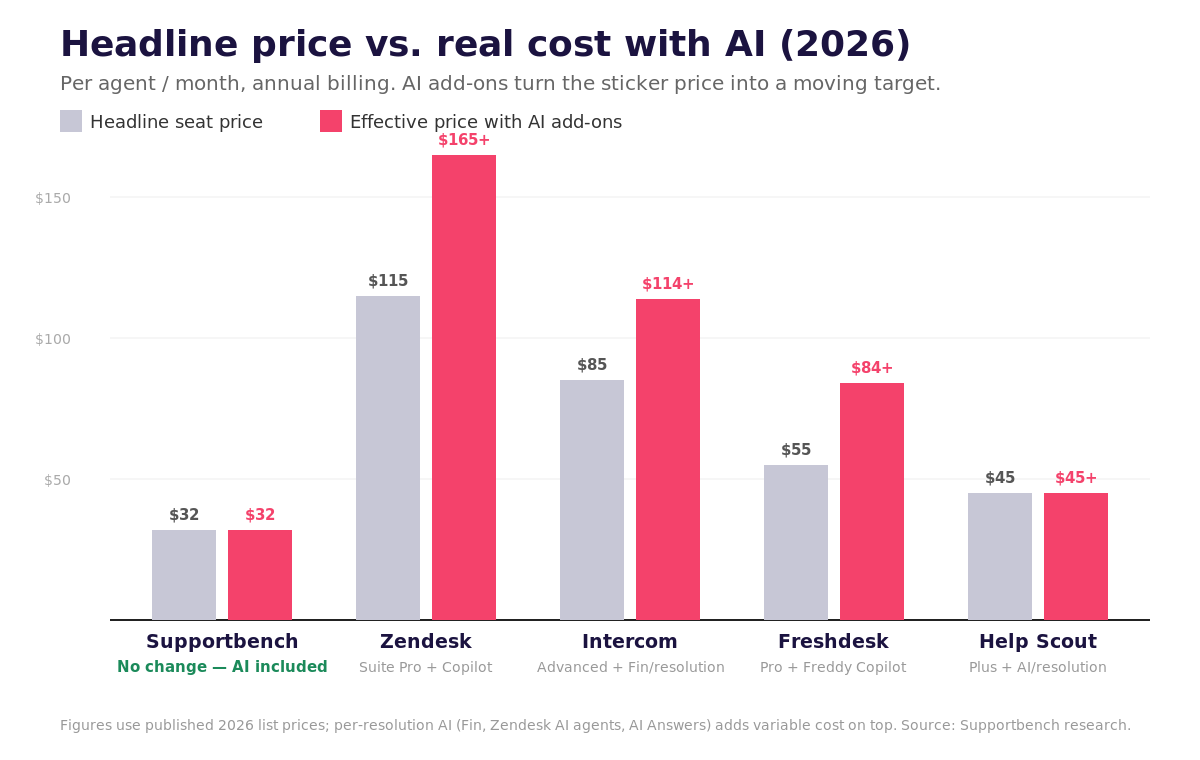
The biggest budgeting mistake in 2026 is comparing sticker prices. Once you add the AI most teams actually want, the gap between the headline number and the real bill widens fast. A Zendesk Suite Professional seat at $115 becomes roughly $165 with Copilot — before per-resolution AI agent charges. Intercom’s $85 Advanced seat balloons once Fin resolutions are added at $0.99 each. Freshdesk, Help Scout, and others layer AI on top per resolution or per session.
This is where an all-inclusive model changes the math. Supportbench bundles AI, dynamic SLAs, escalations, knowledge base, reporting, and onboarding into the per-agent price, so a $32/agent plan stays $32 whether your AI usage is light or heavy. For teams running real volume, predictable beats cheap-on-paper. Before signing anything, read the fine print on contract terms, caps, and API limits.
How to choose the right help desk in 30 minutes
You can reach a confident shortlist quickly by matching your support model to each platform’s core strength. A tool built for high-volume B2C chat won’t serve a B2B team juggling multi-stakeholder accounts — and a Slack-native platform won’t help customers who live in email.
An 8-question shortlist checklist
- Which channels drive your conversations — and do they integrate natively (email, web portal, Slack/Teams, phone)?
- Are you supporting individuals or whole accounts? Account-based teams need health scores, renewal/contract visibility, and company hierarchies.
- High volumes of simple tickets, or fewer complex ones? Volume favors routing and macros; complexity favors collaboration and context.
- Do agents need live CRM data (licensing, contract value, renewal dates) inside the case?
- How much IT/admin capacity do you have? No Salesforce admin? Avoid platforms that need one.
- Does support collaborate with other teams (engineering, product, success) and need internal threading and escalations?
- Do you need to monitor account health and churn risk?
- What’s the true budget — seats, AI, implementation, add-ons, and admin overhead combined?
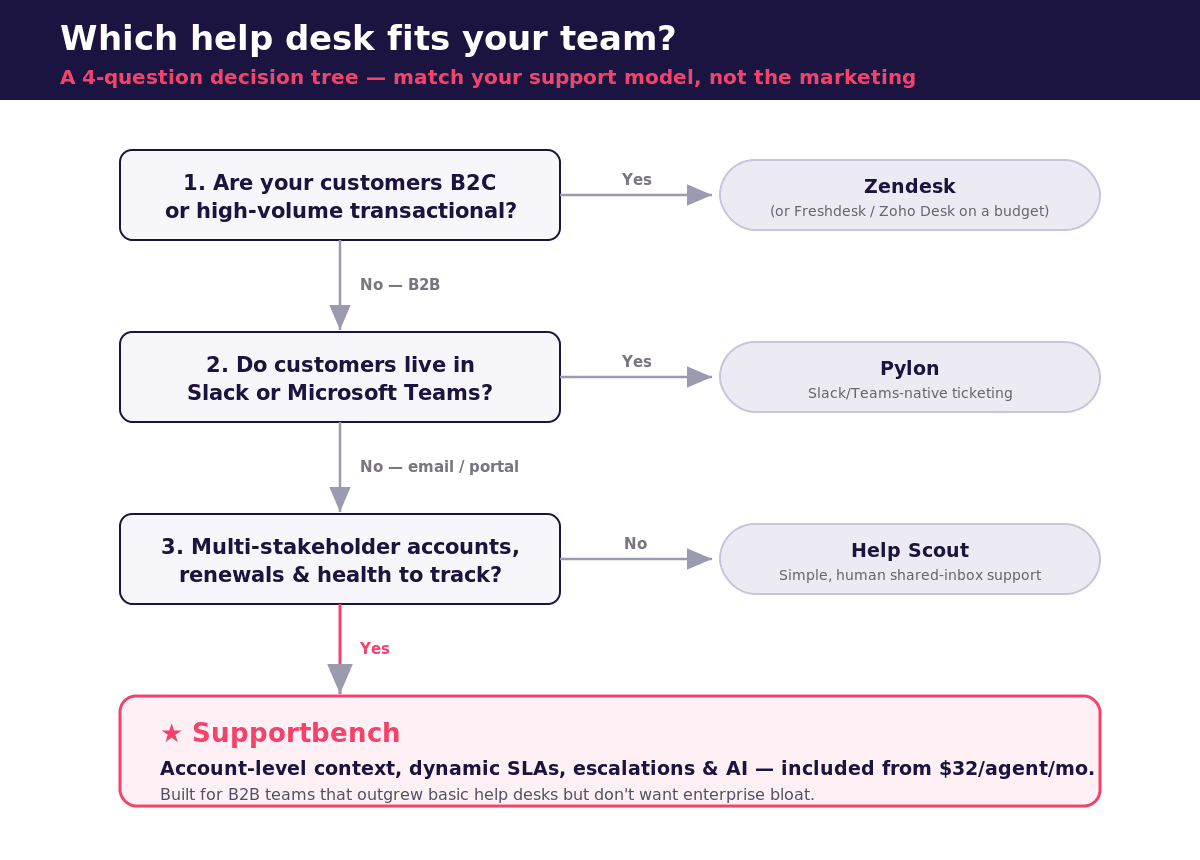
A simple decision tree
Start with your customer type. If you’re primarily B2C or high-volume transactional, a broad omnichannel suite like Zendesk (or budget options like Freshdesk/Zoho Desk) fits. If you’re B2B with account-based relationships, keep going.
Then your primary channel. If customers live in Slack or Teams, look at Pylon. If they use email and portals, move on.
Then account complexity. Most B2B deals involve four or more stakeholders. If you need renewal, contract, and health visibility per account, a purpose-built B2B platform like Supportbench is the strongest fit. For lighter needs, Help Scout works.
Then IT resources. No dedicated admin? Choose a platform support managers can configure themselves and that goes live in days, not months.
Then AI. If you need AI from day one without per-resolution surprises, prioritize platforms where AI is included rather than metered.
Which ticketing system fits your team type?
The eight platforms above serve very different teams. Use the profiles below to narrow the shortlist before you book demos.
Startups moving off a shared inbox
If your startup is drowning in a chaotic shared inbox, the goal is to stop missing messages and start measuring response times — without buying a platform you’ll need an admin for. Focus on setup time, transparent pricing, automation and integrations. Start with what fits now, but make sure it can grow with you.
- Small teams that want email-style simplicity: Help Scout ($25/user/month) — an interface anyone can learn quickly, with a knowledge base built in.
- Tight budget: Freshdesk has a free plan and paid plans from $19/agent/month; Zoho Desk is free for up to 3 agents.
- SaaS startups supporting users inside the product: Intercom, if in-app messaging and proactive engagement matter more than structured tickets.
- Customers that live in Slack or Teams: Pylon.
- B2B startups with several contacts per customer and support/success collaboration: Supportbench — account-level tracking, dynamic SLAs and AI included from $32/agent/month, with onboarding included so there is no admin to hire. It is more than a transactional, high-volume consumer team needs.
Non-technical support teams
Non-technical teams get burned by tools designed for tech-savvy admins: powerful automation that needs someone to build triggers, and AI that needs configuration before it does anything. Look instead for no-code workflows, AI that works out of the box, and routing that does not depend on customers using the right words.
- Supportbench: the AI Copilot is ready to use right away — it suggests responses from case history, summarises prior interactions and flags frustrated customers through sentiment analysis. Intelligent routing reads intent (even misspelled or unusually phrased requests) and assigns by skills, language and workload. Most automation is ready immediately after installation; SSO, Office 365 integration and two-factor authentication are included from the start.
- Freshdesk: non-technical admins can set up event-triggered (Dispatch’r) and time-triggered (Supervisor) rules without code; most customers complete setup in a few days.
- Zendesk: powerful, but building routing rules, custom triggers and AI workflows usually requires technical expertise or outside help.
- Zoho Desk: the budget option, with Zia AI on the higher tiers.
SMBs on a budget
For a small or mid-sized team the trap is the same as for everyone else, just more painful: a low headline price that grows through add-ons and tier jumps. Compare the all-in number.
- Lowest entry price: Zoho Desk (Express from about $7–$9/agent/month; free for up to 3 agents), strongest if you already use Zoho CRM. Setup and customisation can take time.
- Easy generalist: Freshdesk (Growth $19/agent/month) — ease of use and solid core features, with Freddy AI billed separately.
- Everything included: Supportbench ($32/agent/month) — multi-channel inbox, workflows, SLA alerts, AI summaries, knowledge base and analytics with no extra charges for modules, and fast setup with no technical overhead. The trade-off: it may lack some of the deep customisation very large enterprises want.
- Room to grow: Zendesk Suite (from $55/agent/month) if you expect rapid growth and can absorb the learning curve and higher-tier feature gating.
SMB vs. enterprise: what changes as you scale
Both need the same core — omnichannel intake, automation, a knowledge base, reporting — but enterprises add ticket volume, integrations with many platforms, custom roles and sandboxes. Pick a system that scales without forcing a re-platform. Supportbench’s Professional plan already includes SLAs, escalations and reporting, and Enterprise ($100/agent/month) adds sandbox, SSO, white-label and advanced permissions; Zendesk Suite Enterprise ($169/agent/month) adds custom agent roles and sandbox environments. Whichever you choose, check that the features you will need in 18 months are not two tiers up.
IT teams and MSPs
Internal IT, ITSM and Atlassian-standardised teams should start with Jira Service Management (free for up to 3 agents, Standard about $20/agent/month). Managed service providers have their own requirements — PSA integration, multi-tenant clients — covered in our help desk guide for MSPs.
The features every help desk ticketing system should have
Use this checklist in demos. If a vendor cannot show a feature working in the plan you are quoted, ask which tier it lives on and what it costs.
- Ticket management — every inquiry from email, chat, phone or social becomes a trackable ticket with a priority, an owner and a timeline; smart routing, escalation rules and collision detection so two agents never answer the same ticket.
- Automation — auto-responses, SLA reminders, duplicate detection and merging, follow-ups, and auto-closing of inactive tickets.
- SLAs and escalations — response and resolution targets that can vary by customer, plan or account context, with structured multi-tier escalation paths.
- Knowledge base and self-service portal — searchable FAQs, step-by-step guides and community forums that deflect routine tickets.
- Omnichannel support — email, chat, social and phone in one interface, so a customer who starts on chat and follows up by email never repeats themselves.
- Reporting and analytics — custom dashboards, SLA tracking, agent performance metrics and customer-experience KPIs.
- Security and compliance — encryption in transit and at rest, role-based access control, and the regulatory standards your region and industry require (GDPR, HIPAA, SOC 2).
- Integrations — CRM, billing and e-commerce, project and task tools, so agents see purchase history, contract value and engineering status inside the ticket.
- AI — AI-powered routing, real-time reply suggestions, summaries, sentiment and predictive scoring — and clarity on whether it is included or metered.
- Customisability and scalability — custom fields, workflows and roles that support managers can change themselves, on a platform that grows with the team.
Feature comparison matrix (2026)
A capability view of the same eight platforms. “Plan-dependent” means the capability exists but sits on a higher tier or an add-on — confirm the tier in the demo.
| Platform | Channels | Account-level context | SLAs & escalations | AI in the base price | Setup | Free plan |
|---|---|---|---|---|---|---|
| Supportbench | Email, chat, portal, Slack | Built in — companies, hierarchies, health scores | Built in — dynamic SLAs, multi-tier escalations | Yes, all AI included | Self-serve; onboarding and migration included | No (free trial) |
| Zendesk | Email, chat, phone, social | Needs add-ons | Plan-dependent | No — Copilot +$50/agent; AI agents per resolution | Often needs an admin or implementation partner | No |
| Freshdesk | Email, chat, phone, social (Omni) | Moderate | Plan-dependent | No — Freddy Copilot +$29/agent; AI Agent per session | Self-serve, no-code rules | Yes (very small teams) |
| Intercom | In-app messaging, chat, email | Moderate | Plan-dependent | No — Fin $0.99/resolution | Self-serve | No |
| Help Scout | Email-first, with Docs | Light | Light | No — AI Answers $0.75/resolution | Self-serve, fastest to learn | Yes |
| Jira Service Management | Portal, email; ITSM workflows | Asset-centric, not account-centric | ITSM SLAs | Add-on / higher tiers | Needs admin expertise and Marketplace apps | Yes (up to 3 agents) |
| Zoho Desk | Email, phone, chat, social | Moderate (via Zoho CRM) | Blueprint, plan-dependent | No — Zia on higher tiers | Setup can feel complex | Yes (up to 3 agents) |
| Pylon | Slack, Teams, email | Strong (Account Intelligence) | Plan-dependent | No — AI add-ons ~$50/seat + usage | Self-serve | No |
Switching help desks: what usually goes wrong
Choosing is half the job. Teams that upgrade their support platform run into the same ten challenges: integration with existing systems, change management, training and skill development, data migration and security, cost beyond the licence, customisation and configuration, a dip in customer experience during the transition, long-term scalability, the vendor evaluation itself, and buy-in from IT, support and leadership. Two things shrink that list. Pick a platform that includes migration and onboarding — Supportbench migrates from Zendesk, Freshdesk, Help Scout and Jira as part of the plan — and run a real escalation through the tool during the trial rather than watching a scripted demo. Our implementation best practices guide covers the rollout plan.
Why Supportbench wins for B2B support teams
Among the best help desk ticketing systems for account-based B2B support, the math and the workflow both point the same direction. Supportbench delivers the account-level visibility, dynamic SLAs, structured escalations, and native AI that B2B teams need — without the enterprise-suite price tag or the IT dependency. Everything that competitors meter or gate behind enterprise tiers (AI, reporting, knowledge base, health scoring, onboarding) is included from $32/agent/month.
If your team manages multi-stakeholder accounts, tracks renewal risk, or works closely with customer success to reduce churn, Supportbench consolidates fragmented tools into one platform built for exactly that motion. The best way to test it is with your own data: book a 20-minute demo or start a free trial and run a real multi-stakeholder escalation through it.
Frequently asked questions
What is the best help desk ticketing system in 2026?
How much do help desk ticketing systems cost?
Which help desk has the best built-in AI?
What’s the difference between a help desk and a ticketing system?
Why do B2B teams need account-level visibility?
What is the best ticketing system for a startup or small business?
What is the simplest help desk ticketing system for a non-technical team?
Is there a free help desk ticketing system?
How do I compare help desk ticketing systems?
Related reading
- SaaS customer support: the complete guide for B2B teams
- Top helpdesks with native AI capabilities (no plugins required)
- How to compare helpdesk pricing models (seat, usage, add-ons, bundles)
- Help desk software pricing: hidden costs, add-ons and TCO explained
- Best help desk software for MSPs
- Best data-sovereign helpdesks for Canadian/EU companies
- Best practices for implementing a new helpdesk
- Best-of-breed vs. unified platform for support + CS
- Zendesk alternatives: the 8 best competitors for B2B support teams
- ServiceNow alternatives for B2B support teams
- The 9 best customer service platforms for B2B teams
See how Supportbench compares for complex, account-based B2B support.
Book a demo Compare Supportbench →Evaluating help desks for a B2B team?
Supportbench is all-inclusive from $32 per agent per month, with migration and onboarding included. See pricing or book a 20-minute demo.